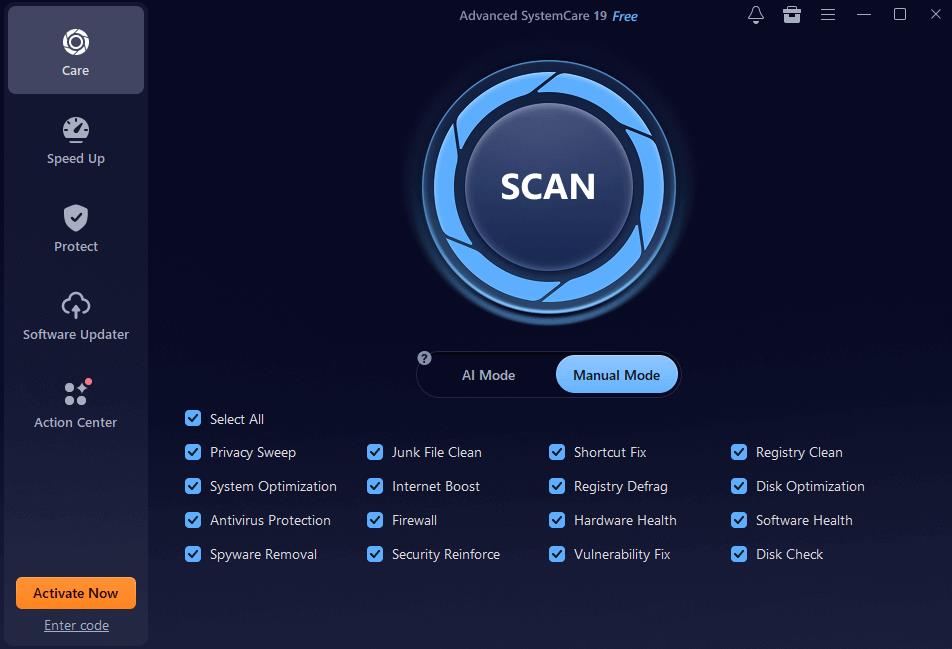
A slow computer can be frustrating, especially when it affects productivity, gaming, or everyday tasks. Over time, Windows PCs accumulate junk files, outdated drivers, broken registry entries, and unnecessary background processes that can reduce overall performance. Fortunately, PC optimization tools can help users maintain a faster, cleaner, and more stable system. Among the most popular solutions available today are IObit’s Advanced SystemCare and Driver Booster.
These tools are designed to improve system performance, enhance security, and ensure that hardware components run efficiently. Whether you’re a casual user, gamer, student, or professional, understanding how these applications work can help you get the most from your computer.
What Is Advanced SystemCare?
Advanced SystemCare is an all-in-one PC optimization and maintenance tool developed by IObit. The software is designed to clean, optimize, and protect Windows computers with just a few clicks. It combines multiple system maintenance functions into a single platform, making it easier for users to keep their PCs running smoothly.
One of the key benefits of Advanced SystemCare is its ability to remove junk files that accumulate over time. Temporary files, browser caches, installation leftovers, and other unnecessary data can consume valuable storage space and slow down system performance. The software scans the computer for these files and safely removes them.
In addition to cleaning functions, Advanced SystemCare helps optimize system resources. It can identify startup programs that increase boot time and disable unnecessary processes running in the background. This allows the computer to start faster and allocate more resources to important applications.
The software also includes privacy protection features. It can erase browsing traces, remove digital fingerprints, and help protect sensitive personal information from unauthorized access. For users concerned about online privacy, these tools provide an extra layer of security.
Key Features of Advanced SystemCare
Advanced SystemCare offers several features designed to improve overall PC health:
1. AI-Powered Scanning
The software uses intelligent scanning technology to detect system issues and recommend optimizations based on user behavior and PC condition.
2. Deep System Cleaning
It removes junk files, invalid shortcuts, temporary data, and unnecessary logs that occupy storage space.
3. Startup Optimization
By managing startup items and services, Advanced SystemCare helps reduce boot times and improve system responsiveness.
4. Privacy Protection
The tool clears browsing history, cached data, and privacy traces to help protect personal information.
5. Real-Time Performance Monitoring
Users can monitor CPU, RAM, disk usage, and system temperature through an integrated performance monitor.
6. Security Enhancement
The software includes features that help identify security vulnerabilities and improve overall system protection.
Why Driver Updates Matter
Many computer users overlook the importance of updating device drivers. Drivers act as communication bridges between hardware components and the operating system. If drivers become outdated, corrupted, or incompatible, users may experience performance issues, crashes, hardware malfunctions, or security vulnerabilities.
Keeping drivers updated can improve system stability, hardware compatibility, and overall performance. This is particularly important for gamers, content creators, and professionals who rely on graphics cards, audio devices, printers, and other peripherals.
However, manually updating drivers can be time-consuming and confusing, especially when managing multiple devices. This is where Driver Booster becomes useful.
What Is a Driver Booster?
Driver Booster is another popular software solution developed by IObit. It is specifically designed to scan, identify, download, and install outdated drivers automatically.
Instead of manually searching manufacturer websites for updates, users can rely on Driver Booster’s extensive driver database. The software detects outdated components and provides one-click updates, simplifying the maintenance process.
Driver Booster supports a wide range of hardware devices, including graphics cards, sound cards, network adapters, printers, USB devices, and more. Regular driver updates can help reduce hardware-related errors and improve overall system performance.
Key Features of Driver Booster
1. Automatic Driver Detection
Driver Booster scans the system and identifies outdated, missing, or faulty drivers.
2. One-Click Updates
Users can update multiple drivers simultaneously without manually downloading files.
3. Large Driver Database
The software maintains access to a comprehensive database of certified drivers for various hardware manufacturers.
4. Improved Gaming Performance
Updated graphics and audio drivers can enhance gaming experiences and improve compatibility with new titles.
5. Backup and Restore
Before installing updates, Driver Booster creates backups, allowing users to restore previous versions if needed.
6. Hardware Error Fixes
The software includes tools designed to resolve common issues related to sound, network connectivity, and device recognition.
The Interaction of Advanced SystemCare and Driver Booster
While both applications serve different purposes, they complement each other effectively. Advanced SystemCare focuses on system optimization, cleaning, privacy protection, and performance enhancement. Driver Booster focuses on maintaining up-to-date hardware drivers.
Using both tools together provides a more comprehensive approach to PC cleaner maintenance. Advanced SystemCare helps eliminate unnecessary files and optimize system resources, while Driver Booster ensures that hardware components operate with the latest compatible drivers.
For example, a computer may experience slow performance due to excessive junk files and outdated graphics drivers. Running Advanced SystemCare can clean the system and improve responsiveness, while Driver Booster can update the graphics driver to enhance stability and performance.
Final Thoughts
It takes more than just the occasional file cleanup to maintain a Windows computer. System optimization and driver maintenance play critical roles in ensuring smooth performance, security, and reliability. Advanced SystemCare offers a comprehensive solution for cleaning and optimizing PCs, while Driver Booster simplifies the process of keeping drivers current and functioning properly.
Together, these tools provide users with an efficient way to maintain system health, improve performance, and reduce common computer issues. Whether you’re looking to speed up an aging computer, optimize a gaming setup, or simply keep your PC running efficiently, Advanced SystemCare and Driver Booster can be valuable additions to your maintenance toolkit.