Map the Risk Before You Buy Hardware
Effective security starts with knowing what you’re safeguarding and what’s threatening it. Explore the site at different times. Note your team’s choke points, blind spots, and shortcuts. Map assets by value and criticality, not location. A server closet that runs your business ranks differently than a stockroom full of high-demand items.
Make a simple threat model. Consider car ramming, opportunistic theft, targeted break-ins, insider danger, and social engineering. Then create security layers for those circumstances. When you know what hurts you most and how it might happen, your investments become a coherent protection.
Harden the Perimeter and Entry Points With Intent
Your boundary is moat. The tone is set with climbing-resistant fencing, correctly secured gates, and storefront and loading bollards, explains B&R Property Management solutions. Doors and frames should be load-bearing beams for security. Use sturdy frames, hinge bolts, and cylinders. Laminated glazing or bonded film on glass buys precious minutes under attack.
Service entrances, loading docks, and commercial garage doors need specific care. Add side-locking bars, monitored contacts, and automatic closers to heavy-duty doors to prevent accidental openings. Connect these access points to logs and alerts for a 2 a.m. forced door. not invisible till daylight.
Make Cameras Useful, Not Just Visible
A camera without identification-grade footage is decorative. Sensors and lenses should match the scene. Face capture and balanced light are needed at entrances. Vehicle approaches benefit from plate-specific views, not just wide angles. Cameras should cover approaches and crossings, not simply walls and fences.
Modern analytics detect loitering, line crossing, and repetitive probing. Use them to filter noise and notice important actions. Define clear retention and viewing restrictions for your activities. Mask private parts, use battery backup, and verify time stamps. Cameras dissuade when they are obvious and provide benefit when they see and save important data.
Control Access With Precision and Hygiene
Keys and shared codes breed uncertainty. Move to role based access that grants the minimum needed, for the hours needed, to the people who need it. Temporary vendor credentials and visitor passes that expire on their own reduce lingering exposure. When someone leaves the company, access should vanish as quickly as their email login.
Avoid tailgating with design and culture. Place readers in low-standing areas with good visibility. Consider a modest vestibule with linked doors in critical areas. Keep records tidy using audit trails and scheduled access windows. Rotate active mechanical lock codes. Secure credential hygiene is like handwashing. Repeat often and consistently.
Lighting That Thinks
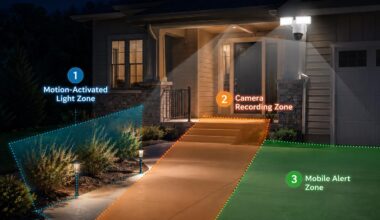
Light watches quietly. Even, bright coverage on entrances, parking lots, and pathways reduces troublesome shadows. Use motion-activated enhancements with ambient light to capture attention after hours. Align illuminance and color rendering with your camera for clear nighttime filming.
Smart schedules that track seasonal sunset changes prevent unlit gaps. Shield fixtures to avoid glare and light spill that bother neighbors or blind lenses. Use battery backups or solar where outages are common. Lighting that adapts and endures is both an energy saver and a crime reducer.
Secure the Digital Nerve of Physical Security
Doors, cameras, and alarms are now computers with sensors. Put them on segmented networks, not the same Wi-Fi as your office laptops. Require strong passwords and multifactor for administrators. Update firmware on a cadence that you can prove, and disable unused services that invite probing.
Recorders and controllers need power stability and graceful failure. Ride UPS units through blips and test fail secure or fail safe for each opening. Secure remote access with a gateway or VPN, not open ports. Log changes, backup setups, and practice restoring. Reliable digital nerves allow the body to react when needed.
People, Culture, and Low Friction Protocols
Many breaches begin with modest habits. Propped door, visitor waved through, misplaced credential never reported. Train in short, frequent spurts using valid site scenarios. Make doing right easy. Automatic locking, self-closing doors, and simple guest sign-ins discourage ideal behavior.
Rewards near-miss reporting and speedy repairs. Conduct occasional social engineering drills to help staff say no. Give guards and supervisors clear post-order and escalation paths. Treat contractors like employees. Clear procedures, simple tools, and unfussy expectations foster security culture.
Prepare, Practice, and Recover
Incidents will happen. Have playbooks for break-ins, power loss, system failure, and severe weather. Define who leads, who calls, and what gets shut down first. Use alarm verification through video or audio to reduce false dispatches without ignoring real risk.
Practice brief drills and tabletop exercises. Test panic buttons, mass notification, and PA systems. After any event or exercise, briefly examine what worked and what didn’t. Salvage priorities, alternate work places, and supplier connections should be in business continuity plans. Know your roles and practice your steps to recover faster.
Measure What Matters and Fund What Works
Security improves with measurement. Track detection, response, and resolution times. Check forced door warnings, camera uptime, and false alarms. Use leading indications like staff training %, device firmware age, and drill completion rate.
Link budget to risk reduction. Create a plan that distinguishes necessities from upgrades and advanced features. Try new tech on a small scale before scaling. Maintain a limited supply of door, camera, and controller spares. To avoid silent defense deterioration, plan replacement cycles and negotiate support conditions.
Coordinate With Landlords and Responders
Lease premises and discuss obligations with the owner. Determine who maintains perimeter lights, parking cameras, and physical modifications. Provide local responders with brief site maps showing entrances, shutoffs, and contact locations. Lock such information in a safe but accessible place with updated keys and codes.
When everyone who might arrive at 3 a.m. knows where to go and what to expect, the difference in outcomes can be measured in minutes and dollars.
FAQ
How do I decide which access credential type fits my business?
Your credential should match your risk and workflow. Cheap cards and fobs can be lost and shared. Mobile credentials can be revoked promptly and reduce issuance overhead, but staff phones and connectivity are needed. PIN pads protect low-risk doors, but shared codes compromise responsibility. Many sites use a mix, saving the harshest approaches for delicate areas.
What is the most impactful first step for a smaller site with a tight budget?
Repair problems silently. Check outside doors and locks, light corners, and install one or two high-quality cameras on main entrances and approaches. Install simple door position sensors with after-hours notifications. The essentials limit opportunities and raise awareness without spending much.
How often should I review and update access permissions?
Treat access like payroll. Review at least monthly, and immediately after role changes or departures. Automate wherever possible so HR changes trigger access updates. Periodic audits by area owners ensure that only current, needed permissions remain.
How can I reduce false alarms without missing real incidents?
Layer verification. To avoid dispatching from one sensor, pair door contacts with interior motion or video analytics. Set workflow-appropriate entry and exit delays. Maintain sensors and keep them close to the area of interest to avoid misfires. Review alarm history for patterns and sensitivity adjustments.
Do I need a formal visitor management process for a small office?
Yes, but it can be lightweight. Require sign-in, issue a visible badge, and ensure hosts escort visitors. Log entry and exit times. Even a simple system creates accountability and makes tailgating less likely. For frequent service providers, use time bound credentials that expire automatically.
What maintenance keeps doors and cameras reliable over time?
Conduct quarterly checks. Verify door alignment, closer speed, latch engagement, and hinge hardware. Lens cleaning, field of vision verification, and nighttime performance testing. Update firmware regularly, check storage, and test backups. Small periodic maintenance protects good systems from deteriorating.