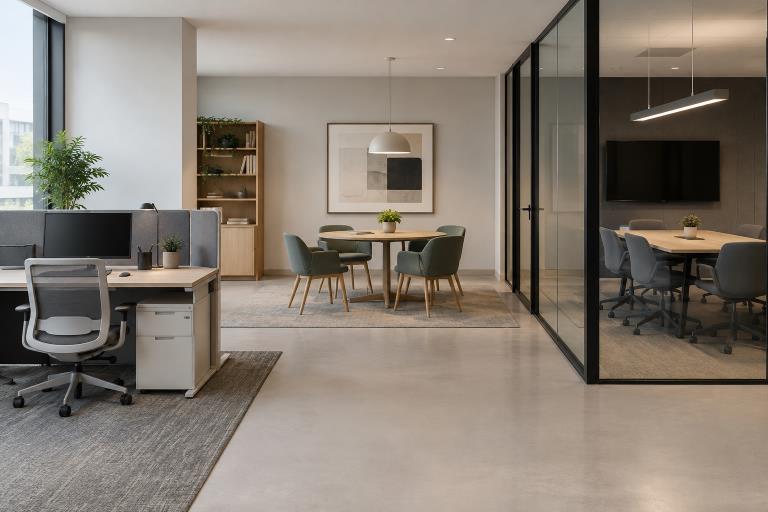
A flexible office is not simply a smaller office with shared desks. It is a workplace planned around the activities people need to perform, the times they work together, and the conditions that help them do their best work. For practical support while exploring layout options, click this website to see how workplace design can be approached with both daily use and future change in mind.
The aim is to give employees a clear reason to use the office. That may mean making it easier to collaborate, conduct private calls, meet clients, use specialized equipment, learn from colleagues, or complete focused work away from home distractions. A successful plan starts with purpose rather than a trend.
Start With a Clear Purpose
Before measuring desks or choosing furniture, define the office’s purpose. Identify work that benefits from in-person interaction—planning, onboarding, project reviews, training, and relationship-building—and distinguish it from tasks requiring quiet focus or thriving on conversation.
A growing company, for example, may need fewer assigned desks and more team rooms, private call spaces, and project areas. Headcount alone doesn’t determine the right layout; understand how people work.
Use Workplace Data Before Drawing Plans
Attendance can vary by department, weekday, season, and project cycle, so averages do not tell the whole story. Review the busiest days and typical usage. The workplace optimization approach used by the U.S. General Services Administration also emphasizes forecasting needs and adapting space to changing work patterns.
Data Points to Review
- Average and peak daily attendance.
- Desk reservations and meeting-room demand.
- Team schedules, meeting peaks, and visitor needs.
- Feedback about noise, privacy, storage, and comfort.
- Expected hiring, restructuring, or technology changes.
Build a Mix of Work Zones
One large open room rarely supports every kind of work well. A better approach is to create a clear mix of settings that lets employees choose a space based on the task at hand.
- Focus areas: Quiet rooms, low-distraction desks, and individual work points.
- Collaboration areas: Team tables, writable surfaces, and project rooms.
- Meeting rooms: Spaces for interviews, client discussions, and video calls.
- Social areas: Lounges or café-style settings that encourage informal connection.
- Flexible areas: Rooms that can shift between training, workshops, and project work.
Zoning also helps manage sound. Place lively social spaces and collaborative rooms away from quiet work areas, and provide enclosed options for calls that would otherwise disrupt nearby desks.
Choose a Seating Model That Fits the Team
There is no universal seating model. Assigned seating can suit employees who need fixed equipment, physical files, or close daily proximity to a team. Hot desking can work when attendance changes frequently, and workstations are standardized. Team neighborhoods provide a department home base without giving every person a permanent desk, while activity-based seating lets people move between settings throughout the day.
Many organizations use a hybrid model that combines assigned seats, shared desks, and reservable rooms. Whichever approach is selected, make the operating details simple: provide lockers, consistent monitors and chargers, accessible power, clear booking rules, and realistic cleanup expectations.
Plan Technology Into the Layout
Technology should be planned with the walls, furniture, lighting, and electrical infrastructure, not added after construction. Reliable wireless coverage, power at desks and in lounge seating, room-scheduling tools, and secure network access all affect how easy a space feels to use.
Hybrid meeting rooms deserve special attention. Remote participants need to be visible and audible, while people in the room need microphones, cameras, displays, and controls that work without a lengthy setup. A large screen alone will not create an inclusive meeting experience.
Support Comfort, Privacy, and Well-Being
Comfort is a practical part of office performance. Adjustable chairs, appropriate desk heights, screen-friendly lighting, acoustic materials, visual privacy, accessible circulation paths, and quiet rooms can help people work with fewer unnecessary distractions. Give employees some control over where and how they work whenever possible.
Research on hybrid work has also highlighted the value of clear expectations and coordinated office time. Recent findings on hybrid-work policies suggest that attendance by itself is not the goal. Purposeful, well-coordinated time together is more useful than bringing people into an office without a clear reason.
Make the Space Easy to Change
Flexibility should be both physical and operational. Use movable tables, lightweight seating, modular partitions, and furniture that can serve more than one purpose. Plan consistent power and data access so changing a room does not require a major retrofit.
A conference room, for instance, can become a workshop space when tables move easily, writable surfaces are available, and presentation technology supports different room arrangements. This adaptability helps the office stay useful as teams, projects, and attendance patterns change.
Follow a Practical Planning Process
- Gather information: Review attendance, lease constraints, goals, and future plans.
- Interview employees: Learn what supports or interrupts their work today.
- Map activities: Identify tasks needing focus, privacy, teamwork, or equipment.
- Test layout options: Compare several plans before committing to major purchases.
- Test technology: Confirm that power, sound, video, and connectivity work together.
- Set clear rules: Explain expectations for booking, storage, cleanup, and room use.
- Review after move-in: Track use and adjust based on real employee experience.
Avoid Common Hybrid Office Mistakes
Common problems include planning for maximum desk capacity rather than peak-day needs, creating open seating without quiet alternatives, adding shared desks without storage, and locating video rooms next to noisy social areas. Other mistakes include choosing furniture before testing the floor plan and launching a new system without explaining how it works.
Common Questions About Flexible Offices
How Many Desks Does a Hybrid Office Need?
Use peak attendance, role requirements, team schedules, and meeting demand. Daily averages are useful, but the busiest days reveal whether the office has enough seats and support spaces.
Is Hot Desking Right for Every Business?
No. It works best with dependable booking tools, standard equipment, secure storage, and clear rules. Roles that rely on specialized tools or sensitive physical materials may need assigned workstations.
How Often Should a Flexible Office Be Reviewed?
Review the space after the first few months, then revisit it as staffing, attendance, and business priorities change. Treat the office as a working system that can improve over time.
Conclusion
A flexible office works when its layout reflects how people actually work. By connecting attendance data, work zones, seating, technology, comfort, and change-ready design, organizations can create a workplace that is easier to use, easier to manage, and more valuable to the people who depend on it.